
Appearance
Quick Start
From zero to a running branch in a few minutes - all in the app, no CLI required.
1. Install and open
Download Pomelo-<version>.dmg from the latest release, drag Pomelo into Applications, and open it. See Install for details.
2. The welcome page
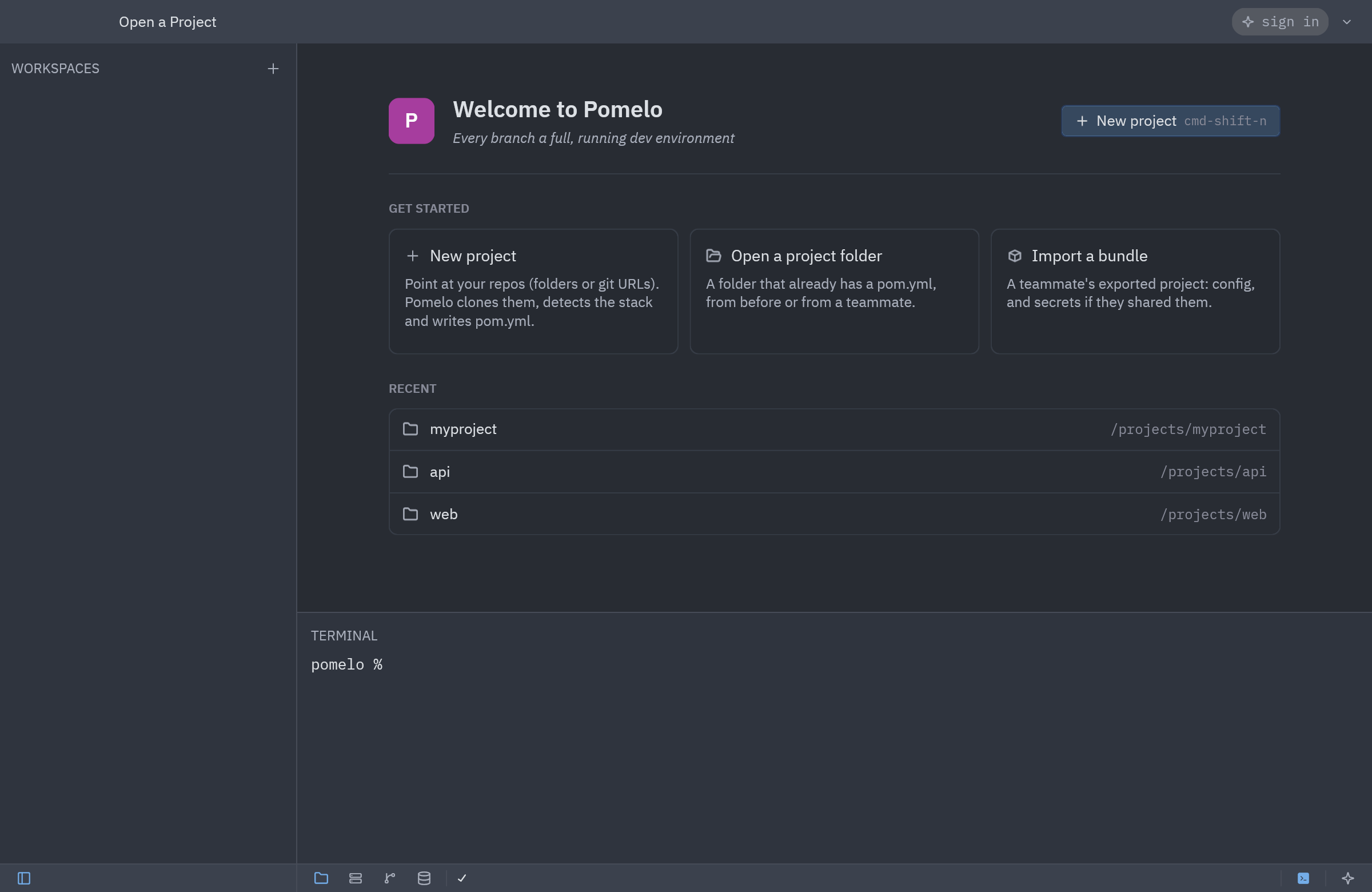
With no project open, the window shows the welcome page:
- New project (
cmd-shift-n) - start from your repos. - Open a project folder (
cmd-o) - a folder that already has apom.yml. - Import a bundle - a teammate's exported config; it imports into the project open in the window, so open or create one first.
- Recent - the projects you created or opened.
- This Mac - whether Docker runs, which git you have, and which Agent CLIs are installed (Claude Code, Codex, Gemini CLI). Start Docker opens Docker Desktop or OrbStack; Check again re-checks.
A project is one pom.yml - your repos and every workspace--<branch>/ worktree live under it. New session... in the project menu (click the project name, top left) starts one from any window.
3. New project - Repositories
New project opens as a tab in three steps. The first asks for:
- a Session name - the project is created at
~/pom/<name>, shown under the field, - the Default branch (
mainunless you change it) - main's branch in every repo, - your Repositories: under Folders, Choose folders... takes a folder with a
.gitinside, or a folder of repos; under Git URLs, paste one or several URLs (SSH or HTTPS) and Add.
Each repo shows the alias it will get (edit it), the stacks Pomelo detected in it, its compose file and how many gitignored .env files it has. A URL is only scanned once it is cloned. Below, Shared services found in compose files lists the containers one set of which will serve every workspace.
4. Setup - who writes pom.yml
- Set up with an agent CLI (recommended) - the agent reads every repo and writes a complete
pom.yml(services, setup, migrations, env wiring); Pomelo then checks it installs and boots and hands problems back to it until it is clean. Pick Claude Code, Codex or Gemini CLI; only installed ones can be picked. - Set up manually - Pomelo drafts
pom.ymlfrom what it detected (no tokens) and you finish it.
Options:
- Import gitignored .env values as secrets - their values stay encrypted on this Mac; the agent only sees their names.
- Start the shared services when done.
- Create a first workspace on the branch you type.
Review sums up what will happen. Nothing in your repos changes: Pomelo works in its own clones under the session folder. Create (cmd-enter) starts it; your agent-or-manual choice is remembered for next time.
5. Setting up
P
Setting up myproject3 repositories - 1m 12s so far
Hide agent CLIPauseCancel50%
Clone repositories4s
apilinked
weblinked
workercloned
Scan0 tokens1s
apiRailspostgresredis3 env
webVite1 env
workerNoderedisminio0 env
Configure with Claude Code52s
api: services web (bundle exec puma), jobs (bundle exec sidekiq)
api: setup bundle install - migrate bin/rails db:migrate
api: DATABASE_URL -> postgresql://{{shared.postgres.url}}/{{db.main}}
web: services dev (pnpm vite --port $PORT)
Hide agent CLIOpen pom.ymlSkip the agent - finish manually
4
Verify
The tab follows the setup, phase by phase:
- Clone repositories - each repo with its progress: local repos are linked (cloned with their uncommitted work), URLs cloned.
- Scan - how each repo runs, its shared services and env files. No tokens.
- Configure with the agent (Configure with Claude Code) - the agent CLI runs in the agent dock: watch it, type to it, or stop it. The tab lists what
pom.ymlsets up so far. Skip the agent - finish manually stops it and goes on with the draft; Let the agent finish it after all brings it back. Claude Code says when it is done; for Codex and Gemini CLI press It is done - verify. With Set up manually this phase is Draft pom.yml. - Verify - the config doctor, then each repo's setup and migrations in main, then every service booted once (it must answer on its port, or stay up if it has none) and stopped again.
- Repair - the first check that fails shows with its output: Fix with Claude Code (or the agent you picked) sends it to the agent and verifies again once the agent is done; Fix manually offers Open pom.yml and a terminal in the repo, then Verify again; Skip this service leaves a service that will not boot out of the checks.
Pause holds the setup between steps; Cancel stops it and removes what it created: the session folder, its secrets and its services.
When every check passes, the tab shows the project is ready: how many repos, services, shared services and databases it has, what each repo runs, and what to do next - open the first workspace (or Create a workspace), Start main's services, or Open pom.yml.
If something still keeps a project from running later (a tool not installed, Docker not running, a secret not set), a Project setup needs attention notice names it, with Fix with Claude. The config stays editable from main; every save is checked before it is written.
6. Start services
Open the Services panel (ctrl-shift-s) and start a service from its row. Starting a repo service brings up its shared services (Postgres, Redis, ...) automatically. Click a running service to open its console.
To work on a feature, create a workspace for a branch with + in the WORKSPACES sidebar (see Workspace lifecycle) and start its services the same way - every branch gets its own ports, databases, and env, so you can run several at once.
7. Browse the database
Open the Database panel (ctrl-shift-d) to inspect a branch's data without a separate client. Pomelo already knows the connection: browse tables and Redis keyspaces, open a table as a grid, or run SQL in a console. See Databases.
From a terminal
The same flow works with the pom CLI (inside the app at Pomelo.app/Contents/MacOS/pom):
bash
pom init [name] [--ai]            # a project from the git repo you are in
pom onboard --new myproject --repo ./api --repo ./web [--no-ai]
pom onboard [session]             # let Claude finish an existing project
pom config edit                   # edit pom.yml, then check it still loads
Writing pom.yml by hand
If you'd rather author the config yourself, here's a minimal shape:
yaml
session: myproject
default_branch: main

shared_services:
  postgres:                  # well-known: image/ports/creds filled in

repos:
  api:
    databases:
      main: "{{branch.safe}}"
    env:
      DATABASE_URL: "postgres://{{shared.postgres.url}}/{{db.main}}"
    setup: [go mod download, go run . migrate]
    services:
      server:
        cmd: go run . serve
        port: true            # another repo reaches it as {{api.server.url}}
See the config reference for every field and Templates for the full {{...}} grammar.