
Appearance
Agents
Each workspace has a main agent: the coding agent CLI Pomelo opens in the agent dock, rooted at the workspace and wired to Pomelo's MCP tools. Next to it you can start side agents for a question, a review or a fix without disturbing the main conversation, and see what all of them use.
The main agent
The agent button (cmd-?) opens the command set in Settings > Agent > Agent Command (claude by default) in the agent dock. Its tab is pinned first and titled Main.
To keep agents next to your code instead, set Settings > Agents > Open Agents In to Editor Tab: every agent then opens as a tab in the focused pane of the editor area. An agent already open, in either place, is focused rather than opened twice.
With Claude Code it resumes the workspace's own conversation, gets the MCP tools and Pomelo's system prompt, so mid-task it can check ports, databases and services and act on the real stack. The agent runs in its own holder: closing its tab or quitting the app leaves it running, and the tab reattaches. To end it, right-click its tab and choose Stop Agent; or set Settings > Agent > Closing an Agent Tab to Stop the Agent so closing the tab ends it too. Pomelo never stores AI credentials; you log in to the CLI yourself.
Scripts, orchestrators and other agents can drive these sessions too: see Driving agents from scripts.
Side agents
A side agent works next to the main one on something narrow. It never changes the workspace's agent status: only the main agent's state shows on the workspace row.
Click + in the agent dock's tab bar to start one. Pick what it is for:
| Type | For | Can it edit? |
|---|---|---|
| Ask | Why, how or where - about the code or the plan | read-only |
| Review | Read the branch diff and report bugs | read-only |
| Second opinion | Same question to another CLI (codex or gemini on your PATH) | read-only |
| Fix | Fix a bug or a failing check | can edit |
Then what it starts with, each with an estimate of the tokens it begins with:
- Auto - picks for you: a fork while main is small, a compacted fork once main is over 50k tokens, and fresh when there is no main session.
- Fork - a copy of main's whole session. Most detail; reuses main's prompt cache.
- Compacted - fork, then
/compactinside the fork. Main itself is never compacted. - Fresh - no history. Pomelo writes a packet (branch, ticket, recent commits, changes) for it to read. A second opinion always starts fresh: another CLI cannot read Claude's session.
Double-click a type to start it right away. The popover also offers New agent in a new workspace, for parallel code changes that need their own branch, ports and database.
Read-only agents run in Claude Code's plan mode; a Fix agent may edit files.
The side agent bar
A side agent's tab shows a bar above its terminal: its type, read-only or can edit, what it started with, and two buttons:
- Send to main - puts the side agent's last answer into the main agent's prompt (not sent), so you can add to it and send it yourself.
- Archive - closes the side agent. Closing its tab stops it.
The clock button in the dock's tab bar lists Archived side agents; click one to reopen it on its own transcript.
Asking from anywhere
- The terminal - right-click a terminal: Add Selection to Agent puts the selection into the main agent's prompt, and Ask Agent about Selection starts an Ask side agent about it. With nothing selected it becomes Ask Agent about This Output, which sends the terminal's last lines.
- Services - a crashed service's Fix with Claude starts a Fix side agent with the service's output.
- Database - Ask Claude about this table (or ...this schema) in the Database panel's menu starts an Ask side agent about it, and a failure's Fix with Claude starts a Fix side agent with the error.
Usage and plan limits
Pomelo shows what the agents use, read from Claude Code's own transcripts: no tokens are spent to know it.
In the title bar
The chip at the right of the title bar shows the Claude account signed in on this Mac, a bar of its 5-hour window and both windows' use: dev 23% 5h 29% wk. Click it for a card with the account, its plan, each window with when it resets, Open Agent Usage and Refresh Now. The bars turn yellow at 70% and red at 90%.
The limits come from two places:
- The agents' status line. Claude Code hands its status line command the account's limits on every refresh. The Claude agents Pomelo starts run their status line through Pomelo first, which keeps the limits and then runs your own status line command from
~/.claude/settings.json, so what you see in the agent is unchanged. - The usage endpoint Claude Code itself uses, asked every five minutes when no agent reported lately, and left alone for fifteen minutes after it refuses a request. It refuses callers that ask often, so while no Pomelo agent runs the chip can go a while without numbers; start an agent and they show within seconds.
Pomelo reads the account and its sign-in from what Claude Code saved (the keychain, then ~/.claude/.credentials.json); it never asks for them.
In the status bar
The status bar shows today's API-equivalent cost ($17.25 today). Click it for the windows and today's cost by workspace.
The Agent usage tab
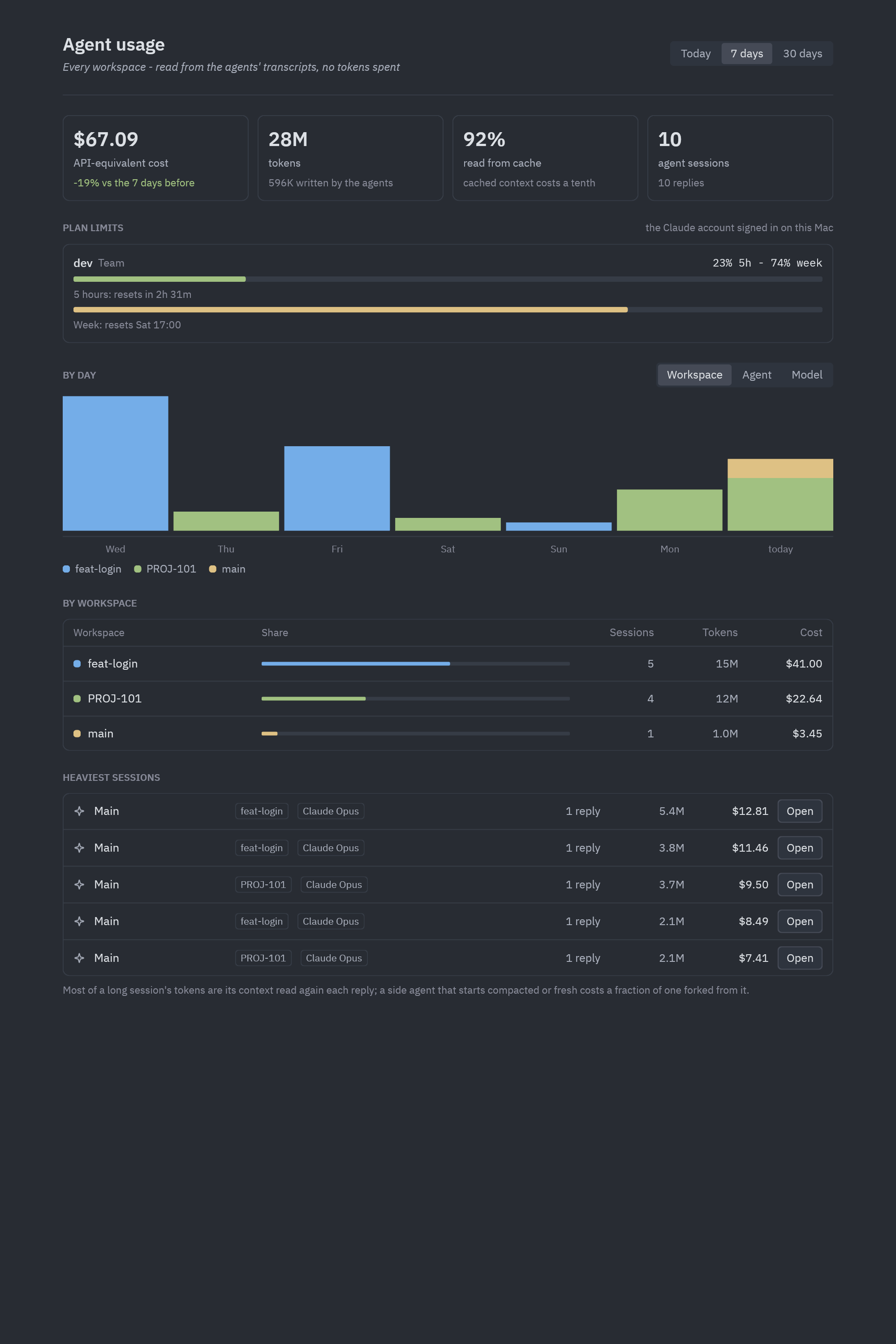
Agent Usage (cmd-shift-u, the chip's card, or the title bar's app menu) opens a tab for the project:
- Today, 7 days or 30 days.
- The period's API-equivalent cost against the one before, tokens (and how many the agents wrote), the share read from cache, and the number of agent sessions and replies.
- Plan limits, as in the title bar.
- A chart by day, stacked by Workspace, Agent (main, side or task agents) or Model. The five largest groups get their own color; the rest are one gray "others".
- A table of the same groups with their share, sessions, tokens and cost. Click a workspace to see only it.
- The Heaviest sessions, each with Open to reopen that agent.
Why cost is "API-equivalent"
Tokens are priced at the model's API rates, with cached context at a tenth of the input price. A subscription is not billed per token, so read the cost as a measure of how heavy the work was. Most of a long session's tokens are its context read again on each reply; a side agent that starts compacted or fresh costs a fraction of one forked from it.
Only Claude Code sessions are counted for now.
The app menu
The chevron at the far right of the title bar opens the app menu: the signed-in account (click it for Agent Usage), Check for Updates... (or Restart to Update once one is ready), Release Notes, Settings, Keymap, Next Theme, Agent Usage and Panel Layout (the agent dock on the right or the left).